Easily adjust your templates widths and column layout via the Layout Options section of your templates parameters which can be accessed by navigating to Extensions -> Template Manager -> J51_YourTemplate.
Set you template width using the appropriate field in pixels. By default this is set to 960 which sets your template width to 960px.
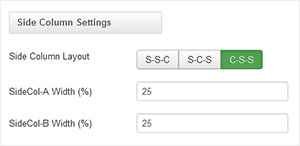
From your 'Side Column Layout' buttons simply set the layout of your side columns in relation to your site content with options for both your side columns to appear on either the left or the right or on either side of your content/component area.
For a single column layout simply disable all modules in the sidecol-a and sidecol-b module positions.
Your side column widths can also be customised via this section. Place the desired width of your side column by percentage in the Side Column Width field. Your content area will automatically contract/expand to fill the remaining available area.